
You are here:
VisioBraille VarioUltra
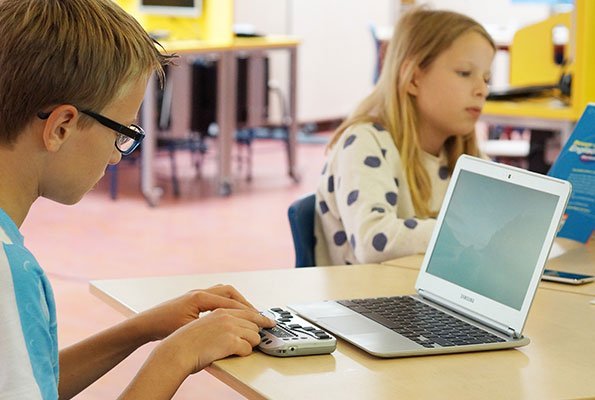
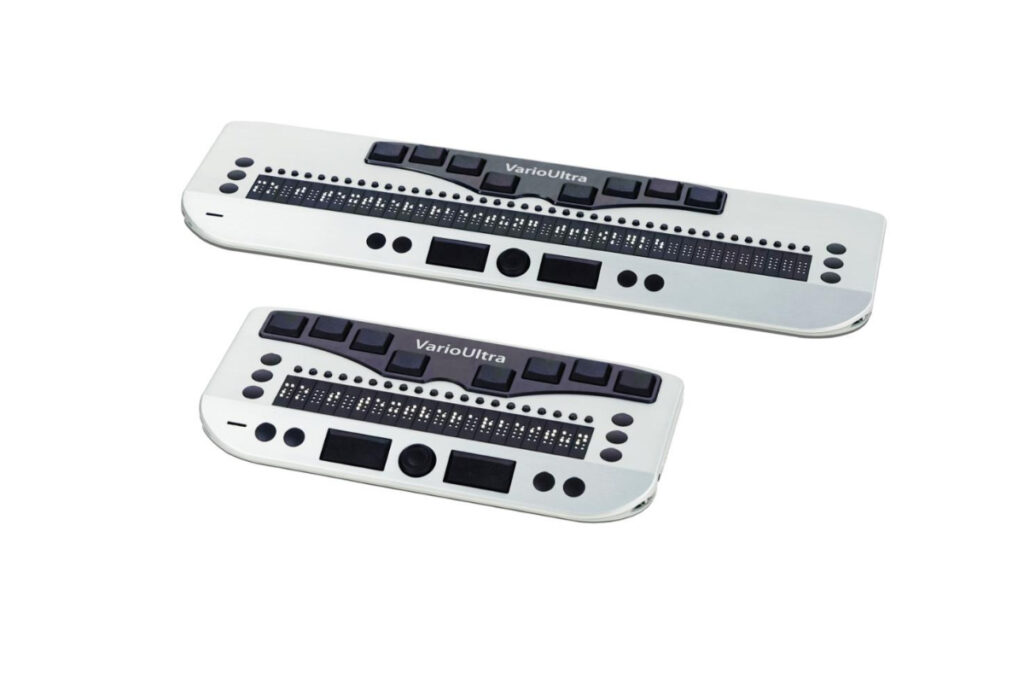
The VarioUltra is a portable braille display available with either 20 or 40 braille cells and an 8-dot braille keyboard. It features a powerful word processor that supports both the input and output of contracted braille. The VarioUltra can open and edit Microsoft Word DOC and DOCX files, as well as display PDF and Excel files. It can connect simultaneously to up to four Bluetooth devices and one USB device. Switching between connected devices is quick and easy with the press of a button, allowing users to work seamlessly across a PC, tablet, and smartphone at the same time.
The USB-C connector is more durable and can be inserted in either orientation. It is smaller than previous USB connectors and offers the key advantage of a symmetrical design. Since there is no top or bottom side, it does not matter how the connector is inserted. USB-C is also backward compatible, meaning older connections can still be used with the appropriate adapters.
Product specifications
- 8-dot braille keyboard with two ergonomic space keys
- Available with 20 or 40 braille cells and cursor routing
- Three function keys on both the left and right sides of the braille display
- Four function keys and a navigation stick
- Built-in word processor with support for contracted braille
- DOCX, DOC, PDF, and Excel file viewer
- Scientific calculator
- File manager with ZIP compression and extraction
- Clock, calendar, alarm, stopwatch, and timer
- Compatible with PCs, Macs, and laptops
- Compatible with iPhone, iPad, Android, and GNU/Linux devices
- Supports various screen readers
- Integrated lithium-ion battery
- USB charger included
- Battery life of approximately 8 to 12 hours, depending on usage
- 256 MB RAM and 32 GB flash storage
- VarioUltra 40 dimensions: 31.6 × 8.9 × 2.0 cm, weight 530 g
- VarioUltra 20 dimensions: 18.8 × 8.9 × 2.0 cm, weight 320 g
- USB-C port for charging and computer connectivity
- USB-A port for USB flash drives
- Supports up to four simultaneous Bluetooth connections
Frequently asked questions
A braille display is an electronic assistive device for people who are blind or have severe visual impairments. It converts digital text into tactile braille. Using movable braille cells, information from computers, smartphones, or tablets can be read line by line through touch.
A braille display is connected to a computer, smartphone, or tablet via USB or Bluetooth. The information displayed on the screen is transmitted to the braille display through specialized software. The individual braille dots automatically raise and lower, allowing the text to be read in braille by touch.
Braille displays are primarily used by people who are blind and want to independently read and work with digital content. They provide direct access to emails, websites, documents, books, and many other types of digital information.
Braille displays can be used both at home and in professional environments. They are suitable for use in schools, universities, workplaces, and private settings. Thanks to their compact design and integrated battery, many models can also be used while traveling.
A braille display enables precise reading of text in braille. Unlike speech output, it allows users to accurately perceive spelling, punctuation, tables, programming code, and other text details. This supports independent learning, communication, and work.
Eligibility for a braille display may exist when a visual impairment or blindness makes it difficult or impossible to use standard screen displays. Eligibility requirements are typically assessed on an individual basis.
In most cases, there must be a documented medical need. Your eye specialist or another qualified healthcare professional can assess the necessity of a braille display and provide the appropriate prescription or recommendation.
Under certain circumstances, the cost of a braille display may be covered by a health insurance provider or another funding organization. Coverage usually requires a medical prescription and an assessment of the individual’s assistive technology needs.
For more information about funding and reimbursement, please contact us or speak with your insurance provider.
A braille display is typically prescribed by an ophthalmologist (eye specialist). Depending on the individual situation and local regulations, other healthcare professionals or authorized agencies may also be involved in the assessment and provision process.
Yes. Modern braille displays are compatible with many common operating systems. They can often be connected to Windows, macOS, iOS, and Android devices, providing accessible access to digital information across multiple platforms.
Knowledge of braille is helpful for getting the most benefit from a braille display. Many users learn braille through specialized training programs or rehabilitation services. Depending on the user’s needs, a braille display can also be used alongside screen reader software and speech output.
- What is a braille display?
-
A braille display is an electronic assistive device for people who are blind or have severe visual impairments. It converts digital text into tactile braille. Using movable braille cells, information from computers, smartphones, or tablets can be read line by line through touch.
- How does a braille display work?
-
A braille display is connected to a computer, smartphone, or tablet via USB or Bluetooth. The information displayed on the screen is transmitted to the braille display through specialized software. The individual braille dots automatically raise and lower, allowing the text to be read in braille by touch.
- Who needs a braille display?
-
Braille displays are primarily used by people who are blind and want to independently read and work with digital content. They provide direct access to emails, websites, documents, books, and many other types of digital information.
- Where can braille displays be used?
-
Braille displays can be used both at home and in professional environments. They are suitable for use in schools, universities, workplaces, and private settings. Thanks to their compact design and integrated battery, many models can also be used while traveling.
- What are the benefits of a braille display?
-
A braille display enables precise reading of text in braille. Unlike speech output, it allows users to accurately perceive spelling, punctuation, tables, programming code, and other text details. This supports independent learning, communication, and work.
- When am I eligible for a braille display?
-
Eligibility for a braille display may exist when a visual impairment or blindness makes it difficult or impossible to use standard screen displays. Eligibility requirements are typically assessed on an individual basis.
- What requirements must I meet to receive a braille display?
-
In most cases, there must be a documented medical need. Your eye specialist or another qualified healthcare professional can assess the necessity of a braille display and provide the appropriate prescription or recommendation.
- Are the costs of a braille display covered?
-
Under certain circumstances, the cost of a braille display may be covered by a health insurance provider or another funding organization. Coverage usually requires a medical prescription and an assessment of the individual’s assistive technology needs.
For more information about funding and reimbursement, please contact us or speak with your insurance provider.
- Who can prescribe a braille display?
-
A braille display is typically prescribed by an ophthalmologist (eye specialist). Depending on the individual situation and local regulations, other healthcare professionals or authorized agencies may also be involved in the assessment and provision process.
- Can a braille display be used with my computer or smartphone?
-
Yes. Modern braille displays are compatible with many common operating systems. They can often be connected to Windows, macOS, iOS, and Android devices, providing accessible access to digital information across multiple platforms.
- Do I need to know braille to use a braille display?
-
Knowledge of braille is helpful for getting the most benefit from a braille display. Many users learn braille through specialized training programs or rehabilitation services. Depending on the user’s needs, a braille display can also be used alongside screen reader software and speech output.