
You are here:
LookyTAB 10 Basic
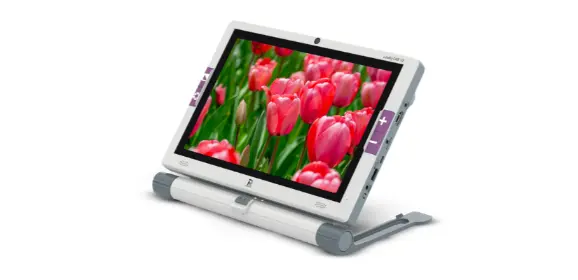
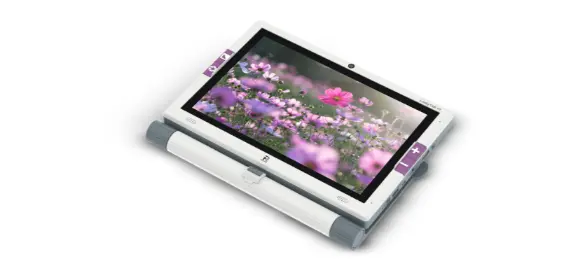
More than magnification: Independence within reach
The LookyTAB 10 is the very latest mobile video magnifier. It is an ideal solution between small, portable handheld magnifiers and large desktop video magnifiers. The large 10.1-inch Full HD touchscreen, combined with the built-in cameras, makes it easy to view and read documents, photos, and text sharply and comfortably, so every detail is clearly visible.
The device is specially designed for everyday use. The LookyTAB 10 helps people with visual impairments experience greater independence, confidence, and ease of use. Great for at home, and great when on the go.
What is the LookyTAB 10?
The LookyTAB 10 is an all-in-one mobile video magnifier that enlarges and optimizes printed and digital materials on a large, crystal-clear screen with high image quality, such as newspapers, magazines, letters, and other documents.
With a 13 MP rear camera for reading and viewing, and a 5 MP front camera for video calls and selfies, it offers powerful and versatile support for communication and daily activities.
The LookyTAB 10 is available in two different versions: a ‘Basic’ model and an OCR-capable ‘Speech’ model. With the Speech model, it is possible to have text read aloud using the optional OCR function (text-to-speech).
Thanks to its intuitive controls, practical built-in apps (calculator, notes, mirror, calendar, etc.), and both touch and physical controls, the LookyTAB 10 is suitable for all ages.
Innovation that enables independence
The LookyTAB 10 offers more than just magnification: It is a tool for maximum independence.
With the built-in slider, the screen can easily be moved from left to right, allowing smooth reading. In addition, you can easily connect the device to a larger screen for better overview and even more comfort
Wichtigste technische Daten
- 10.1” Full HD Display
- 13 MP rear camera / 5 MP front camera
- Magnification up to 25x
- Touchscreen with physical buttons
- Optional OCR and text-to-speech function
- Horizontal slide-and-read ability
- Built-in apps: Calculator, Notes, Mirror, Calendar
- Battery life: 3+ hours
- Charge via DC charger
Zubehör für LookyTAB 10
Get the most out of your LookyTAB 10 with the right accessories.
The LookyTAB 10 is more than just a magnifier—with smart accessories, it becomes a complete workstation for people with visual impairments.
Designed for comfort, productivity, and independence. With these extensions, you can work even more comfortably and have more possibilities within reach.
Large Print Keyboard

The Large Print Keyboard is the ideal addition to the LookyTAB 10.
With large, high-contrast letters and wireless connectivity, you can type effortlessly, navigate menus, and take notes.
It connects easily via Bluetooth 5.0 or a 2.4G USB dongle. Available in a US layout (QWERTY) and a German layout (QWERTZ) for comfort and clarity for every user.
OCR Arm (Separate Add-on)
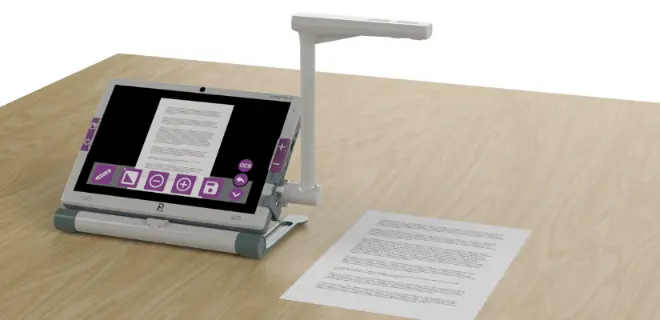
Take your LookyTAB 10 to the next level with the OCR Arm. The OCR Arm is a sturdy, adjustable stand that holds your device at the perfect reading angle.
Combined with the OCR function (Optical Character Recognition), you can scan printed text and have it read aloud instantly. Ideal for longer texts, completely hands-free and without effort.
The OCR Arm ensures stable positioning, a sharp image, and a comfortable viewing height. This transforms your LookyTAB 10 into a powerful desktop magnifier and reading device in one.
The larger display gives your eyes more space to focus without strain.
Yes, the stand makes it easy to set up and pack away again.
Most users can start using it right away, and basic functions are easy to understand from the start.
Yes. It’s perfect for reading, notes, emails, reminders, and more.
Yes, colours and contrast can be adjusted to what feels most comfortable.
- What makes reading feel easier on this screen?
-
The larger display gives your eyes more space to focus without strain.
- Does it fold away neatly?
-
Yes, the stand makes it easy to set up and pack away again.
- Will I need help setting it up the first time?
-
Most users can start using it right away, and basic functions are easy to understand from the start.
- Can I use it for everyday tasks?
-
Yes. It’s perfect for reading, notes, emails, reminders, and more.
- Can I make the screen look the way I prefer?
-
Yes, colours and contrast can be adjusted to what feels most comfortable.